
A nova versão do OTRS 3.3 trouxe várias recursos interessantes, que estão na lista abaixo.
1. BETTER PRODUCTIVITY
- Dashboard ticket lists and regular ticket overviews can now be filtered by eligible ticket columns, and the shown columns are configurable.
- Ticket medium and preview overviews are now sortable.
- Added a calendar widget for the dashboard that can show tickets as events.
- Added new dashboard widget that shows in a matrix form the number of tickets per state and per queue.
- Agents can now mark important articles.
- A new tree selection widget makes working with tree data (queues, services etc.) much faster and easier.
- Added support to search relative dates ( e.g. more than 1 month ago ) in Date and Date/Time dynamic fields.
- It is now possible to specify templates (previously “standard responses”) also for creation of new tickets and for ticket forwarding.
- The list of available processes can now be filtered by ACLs.
- Added support to initiate processes from Customer Interface.
- In many places text is not shortened any more by a fixed number of characters (“Queue1…”), but instead by available screen estate. This makes it possible to see more information at once.
2. IMPROVED WORKING WITH EXTERNAL SYSTEMS
- OTRS can now use multiple customer company databases, thanks to Cyrille @ belnet-ict.
- OTRS can now automatically store customer user data in ticket dynamic fields for permanent storage in the ticket. This can be useful for reporting.
- OTRS is now able correctly assign incoming emails to existing tickets based on ticket numbers from external systems.
- OTRS can now fetch email also over POP3/TLS connections.
3. IMPROVED INSTALLATION & ADMINISTRATION
- Web Installer now can setup OTRS on PostgreSQL, Oracle and SQL Server databases in addition to MySQL.
- Generic agent jobs can now be executed for configured ticket events.
- The new graphical ACL editor makes ACL editing easier.
- Postmaster filters can now use negated filter conditions, thanks to Renée Bäcker.
- Postmaster filters can now specify relative pending dates and Owner / Responsible for new tickets based on incoming email data.
- Customer and Agent passwords now can be encrypted using the strong bcrypt algorithm, which is better than SHA.
- The toolbar icons now use an icon font which makes it easier to create custom skins with different base colors.
O anuncio oficial pode ser encontrado no link: http://www.otrs.com/de/open-source/community-news/release-notes/release-notes-otrs-help-desk-330-beta1/#c48158
Hoje vamos falar sobre o Events Ticket Calendar.
Você deve criar dois campos dinâmicos para o ticket.
- TicketCalendarStartTime
- TicketCalendarEndTime
Agora adicione em algum view de ticket ( Ex. TicketFreeText [Campos livres ])
Os campos dinâmicos devem ser do tipo Date / Time
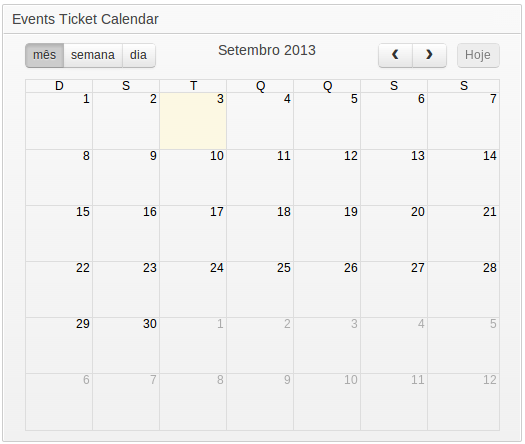
O recurso é interessante, você pode usar para criar agendar, alocar recursos e outros.
Por hoje é isso.


 Dicas de ITSM com OTOBO e Znuny